 Popcorn Panic
Child-directed ads explained for parents
A game can tell the ad company that a child is playing. Here is what changes when it does, what stays the same, and how to check it yourself.
In this guide
Child-directed ads are ads requested with a label that tells the ad company a child may be watching. The label switches off personalised advertising: the ad is not chosen from the child's interests or past activity, and the device's advertising ID is not used to build a profile. It does not remove ads, and it does not decide how often they appear. Those are separate choices made by each game, so check them separately.
Your child plays a free game, and every so often an ad appears. You have probably wondered who chose that ad, and what the company behind it knows about the small person holding the phone.
The answer depends on one quiet setting most parents never see. This guide gives you child-directed ads explained in plain words: what the label is, what it changes, where it stops, and how to check a game yourself. We use our own game, Popcorn Panic, as the worked example, because we can tell you exactly what it sends.
What "child-directed" means
Every time a free game wants to show an ad, it sends a request to an ad company. The request says, roughly, "I have a space, please send me something to put in it."
A game can add a label to that request that says the player may be a child. Ad companies call this a child-directed request. In the United States the idea comes from a children's privacy law known as COPPA, which covers children under 13. Other countries have their own rules with a similar aim, and the big ad companies offer the label everywhere.
So the phrase is about the request behind the advert, not the advert itself. What differs is how it was picked.
What the label switches off
When a request carries the label, two things change:
- No personalised ads. The ad is not chosen from what this player did before, in this game or in other apps. This is often written as "non-personalised".
- No profile building. The phone's advertising ID, a resettable code that normally helps link ad activity together, is not used to personalise ads or to follow the child from app to app.
What is left is sometimes called contextual advertising. The ad is picked from general things, such as the kind of app it will appear in and the rough region the phone is in, not from who the player is.
What it does not change
This is the part that surprises people. The label is about data. It leaves several other things untouched:
- Ads still appear. A child-directed game can show just as many ads as any other game.
- Timing is the game's choice. Whether an ad plays in the middle of a level or only between levels is decided by the developer, not by the label.
- Content is a separate setting. How mild the adverts must be is controlled by a content rating limit that the game sets on its own.
- Some data still travels. An ad cannot be delivered without a connection, so the ad company still sees things like the phone's IP address, which gives an approximate location, and whether the ad was shown or tapped.
- Purchases are unrelated. The label says nothing about in-app purchases. For that, see our guide on how to turn off in-app purchases on Android.
So a parent has two questions to ask about any game, not one. How are the ads chosen? And when, and how often, do they show?
How a game knows a child is playing
There are two common ways.
Some apps are made only for young children. They label every request, for every player, and never ask anything.
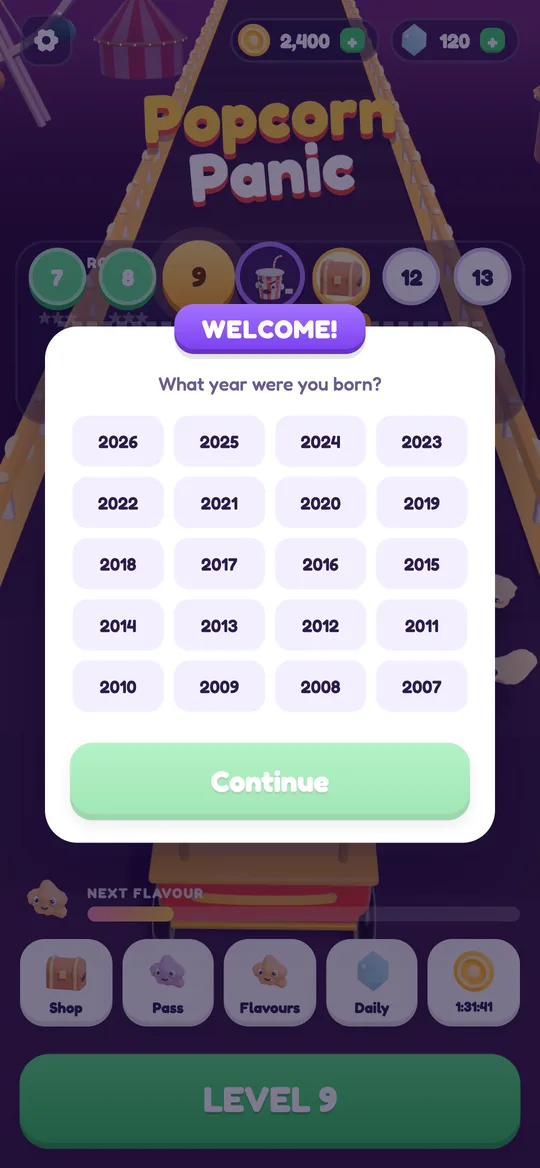
Others are made for all ages and happen to appeal to children too. These "mixed audience" games usually ask for an age or a birth year at the start, then label requests for the younger players. The question should be neutral: no answer filled in already, and no hint about which answer unlocks more.
A real example: Popcorn Panic
Popcorn Panic is a free popcorn crowd runner for all ages. It has ads and no in-app purchases. Here is exactly what happens with those ads.
The first time the game opens, it asks "What year were you born?". The year is saved on the phone only and is used for one thing: deciding how ads work.
If the player is under 13:
- Every ad request is marked as directed to children and as under the age of consent.
- Only non-personalised ads are requested.
- No consent pop-up is shown, and the advertising ID is not used to build a profile.
For every player, whatever their age:
- All ads are limited to a G content rating.
- The only ad company is Google AdMob. No other ad network is in the game.
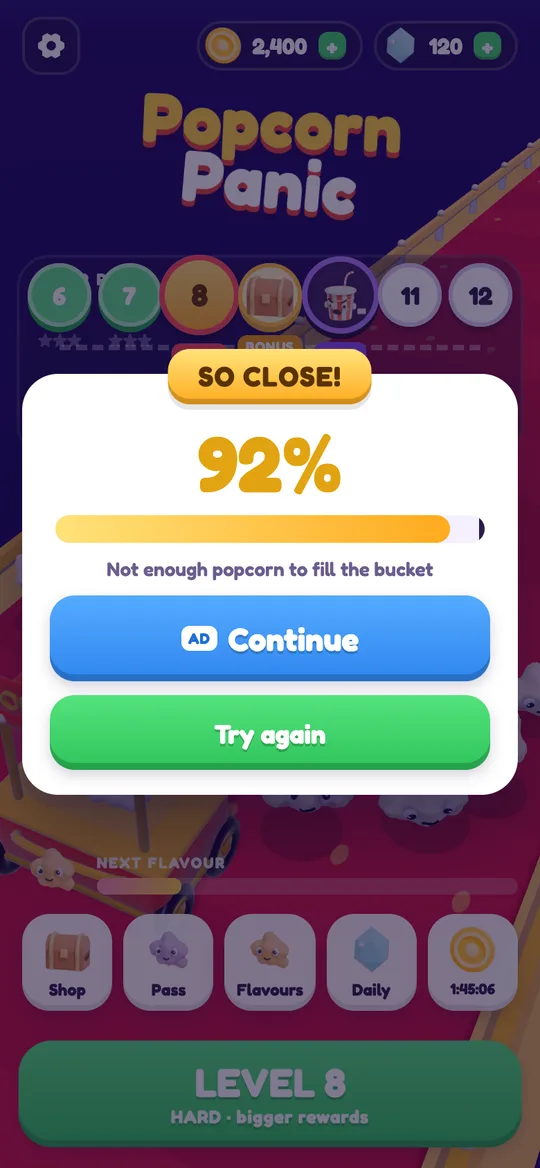
- Reward videos are a choice. They sit behind a button with a small AD tag, and nothing plays unless it is tapped.
- Full-screen break ads only come after a level the player won, from level 6 on. They never play during a level and never right after a loss.
- One small banner sits at the bottom of menus and result cards. It is hidden during play.
Players under 13 also get a grown-up question before any link that leaves the game. Our guide to what a parental gate is shows how that works. For the full picture of ads, data and deletion, read the Popcorn Panic parent guide or the privacy policy itself.
How to check any kids game in five minutes
You do not need to be technical. Sit down with the game and work through this list:
- Open the store page. On Google Play, look for the "Contains ads" note under the title, then open the Data safety section to see what is shared and why.
- Search the privacy policy. Look for the words "child-directed", "non-personalised" or "under 13". A clear policy says in a sentence or two how children's ads are handled.
- Watch the first launch. If the game asks for an age, check that nothing is pre-selected. Sit with your child for this screen, because the answer shapes every ad that follows.
- Play three or four levels. Note when ads appear. Between levels is fair. In the middle of play, or straight after losing, is worth a second thought.
- Look for the AD tag. Buttons that start a video should be clearly marked, so a child knows what a tap will do.
- Check the phone too. In Android's settings, under Google and then Ads (on some phones this sits under Privacy), you can reset or delete the advertising ID for the whole device.
Talking to your child about ads
Settings help, and so does a short chat. Three simple ideas are enough for most young players:
- An ad is someone trying to sell something. It is not part of the game.
- A button marked AD is a choice. It is always fine to say no and press the other one.
- If an ad opens something strange, bring the phone to a grown-up.
A child who understands these three things is hard to trick, in any game.
FAQ
What are child-directed ads?
They are ads requested with a label that tells the ad company a child may be watching. The label turns off personalised advertising, so the ad is not picked from the child's interests or past activity.
Does child-directed mean there are no ads?
No. The setting changes how an ad is chosen, not whether one is shown. How many ads appear, and when, is decided by each game on its own.
Are child-directed ads always suitable for young children?
Not by the label alone. Content is controlled by a separate rating limit that the game sets. In Popcorn Panic that limit is G, the mildest level, for every player.
Is any data still shared when ads are child-directed?
Some. Delivering an ad needs a connection, so the ad company still sees the IP address, which gives an approximate location, and basic facts such as whether the ad was shown or tapped.
How does Popcorn Panic decide who gets child-directed ads?
It asks for a birth year the first time it opens. If the player is under 13, every ad request is marked as child-directed and non-personalised. The year stays on the phone.
Can I turn off ads completely?
Popcorn Panic plays offline, and the internet is only used for ads, so playing with Wi-Fi and mobile data off means no ads appear.