 Popcorn Panic
What is a parental gate in kids games?
The small grown-up question that sits in front of links, settings and deletion, explained in plain words with a real example.
In this guide
A parental gate is a short question inside a kids app or game that a young child is unlikely to answer but an adult can solve in a few seconds, such as a multiplication sum. It sits in front of actions a child should not take alone: opening a web page outside the app, changing important settings, deleting data or buying something. It is a speed bump for small hands, not a lock, so it works best alongside your phone's own parental controls.
You hand a tablet to your child, and a few minutes later they bring it back with a question on screen: "Ask a grown-up. What is 7 × 8?" That small card is a parental gate. It is one of the most common safety features in apps made for children, and also one of the least explained.
This guide answers what a parental gate is in plain words, where you should expect to see one, what it does well and where it falls short. We use the grown-up question in our own game, Popcorn Panic, as a real example, because we can show you exactly how it behaves.
What a parental gate does
A parental gate is a pause button for decisions that belong to an adult. When a child taps something that could take them out of the game or change something important, the app stops and asks a question first. If the right answer comes back, the action goes ahead. If not, nothing happens.
The question is chosen to be easy for a grown-up and hard for a young child. Common formats are:
- A sum, usually multiplication, with a few answer buttons to pick from.
- Written instructions, such as "tap the three blue squares", which a pre-reader cannot follow.
- A press-and-hold, where a button must be held down for several seconds.
Good gates change the question every time. If the same sum always appears, a child quickly learns which button to tap, and the gate stops doing its job.
Where you should see one
Apple's App Store rules for its Kids category ask apps to put a gate in front of links that leave the app and in front of purchases. Many family games follow the same idea on Android too. In practice, look for a grown-up question before any of these:
- Links out of the app, such as a privacy policy, a website or a social media page.
- Purchases or subscription screens, in games that sell anything.
- Deleting data or resetting progress, so a stray tap cannot wipe weeks of play.
- Settings that change how the app treats your child, such as account or sharing options.
If a children's game opens a web browser, an app store page or a payment screen with no question at all, that is worth noticing before you leave your child alone with it.
How the grown-up question works in Popcorn Panic
Popcorn Panic is a free popcorn crowd runner with no in-app purchases, so its gate guards two things: the outside link to the privacy policy and Delete my data. Both live in Settings, the gear icon at the top left of the home screen.
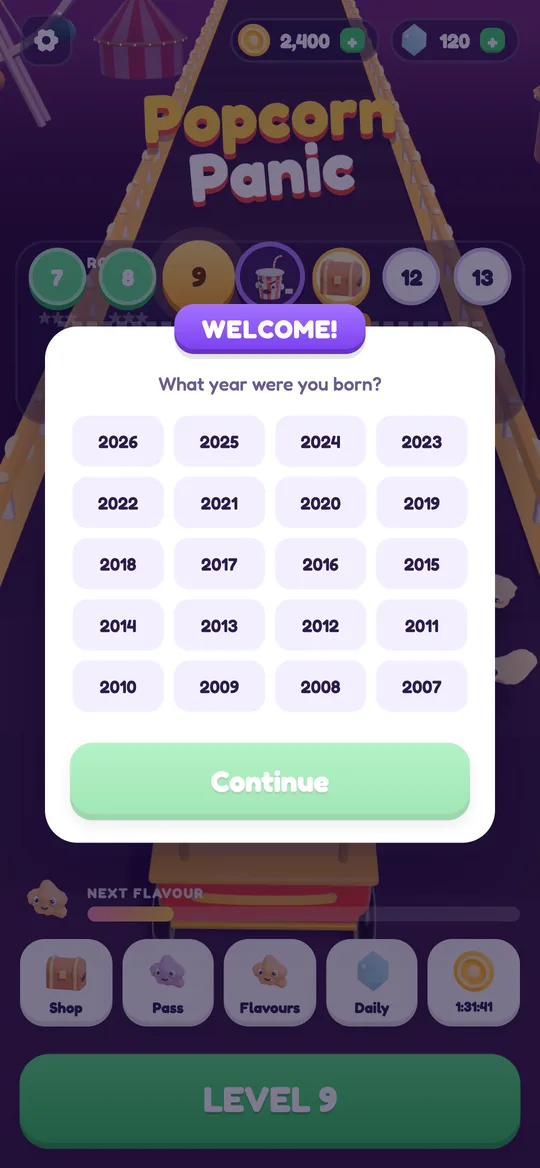
The gate is tied to the birth-year question the game asks the first time it opens. That welcome card has no year pre-selected, and Continue stays grey until one is tapped. The year never leaves the phone. If the player is under 13, the gate is switched on; players 13 and over skip it.
Here is what happens when a younger player taps Privacy policy → Open:
- A card titled ASK A GROWN-UP appears with a multiplication sum, such as "What is 6 × 7?".
- Four answer buttons sit underneath, in a shuffled order, and only one is right.
- A wrong tap shows a short note, "Not quite. Ask a grown-up to help.", and the link stays closed.
- Cancel closes the card and takes the child straight back to the game.
- The right answer opens the page. A new sum is picked next time, so guessing from memory does not work.
Delete my data gets one extra step. After the sum, the game shows a second card, DELETE DATA?, which explains that levels, coins and flavours on this device will be erased, with a red Delete everything button and a Keep my data button. An accidental wipe needs two deliberate choices.

What a parental gate cannot do
A gate is useful, but it is worth being honest about its limits.
- Older children can answer it. A child who knows their times tables will pass a multiplication gate. It is built to slow down younger players and stray taps, not to keep out a determined nine-year-old.
- It only covers that one app. The gate in a game says nothing about what happens in the browser, the app store or other apps on the same device.
- It is not the same as parental consent. A gate decides whether a child can open a link or a setting. It does not replace the rules about how an app collects data from children, which are handled separately (for Popcorn Panic, through child-directed ad settings described in our parent guide).
- It does not remove ads. A game can have a gate and still show ads. Ask separately how and when ads appear.
That is why a gate works best as one layer among several. The others sit in the phone's own settings, which only you control.
Pair it with your phone's controls
The strongest setup is the game's gate plus a lock at the device level. On Android, a few steps go a long way:
- Turn on purchase verification in the Google Play Store app: tap your profile picture, then Payments & subscriptions → Purchase verification, and choose to ask for your password for every purchase.
- Use Google Family Link if your child has their own device, so new apps and purchases need your approval.
- Set a screen lock that only you know on a shared phone, so a child cannot change system settings.
Our step-by-step guide on how to turn off in-app purchases on Android walks through each of these with screen names. Once they are on, a gate inside a game becomes a second fence rather than the only one.
How to check a gate with your child
You can test any kids game in about five minutes, sitting side by side:
- Find the settings. Look for a gear icon and open it together.
- Tap an outside link, such as the privacy policy. A question should appear before anything opens.
- Give a wrong answer on purpose. The app should refuse and stay where it is.
- Try it twice. The question should change, so it cannot be learned by heart.
- Look for Cancel. Your child should always have an easy way back to the game.
- Find the delete option. Check that it is gated too and asks you to confirm.
While you are there, talk about it. Explain that the question is there so grown-ups can help with things outside the game, and that it is fine to bring the tablet over when it appears. A child who knows why the gate exists is much less likely to try to beat it.
FAQ
What is a parental gate?
It is a short question in a kids app, such as a multiplication sum, that an adult answers before the app opens an outside link, changes important settings, deletes data or allows a purchase.
Is a parental gate the same as parental controls?
No. A gate lives inside one app and slows down a young child. Parental controls live in the phone or app store, such as Google Family Link or purchase verification, and cover every app on the device.
Can a child get past a parental gate?
Older children who can read well or know their times tables often can. A gate is a speed bump for young players and accidental taps, so pair it with device-level controls.
Why does Popcorn Panic only show the gate to some players?
The game asks for a birth year the first time it opens. Players under 13 get the grown-up question before the privacy policy link and Delete my data; older players skip it.
Does Popcorn Panic need a gate for purchases?
No, because there is nothing to buy. Coins, gems and flavours are all earned by playing, and reward videos are always an optional choice.