 Popcorn Panic
 gates explained: what every gate does to your crowd
Blue grows, red shrinks, but the details decide close levels. Here is exactly how each gate works and how to choose between two of them.
In this guide
In Popcorn Panic, blue gates grow your crowd and red gates shrink it. POP multiplies by 2 or 3, BUTTER adds a small number to every piece that runs through, and SALT doubles. Red minus gates take away a fixed amount and then fade, while soggy gates cut everything that passes in half. With a big crowd, a minus gate costs less than a soggy one.
Gates are the heart of every Popcorn Panic level. They sit across the road in pairs or on their own, and every kernel or piece of popcorn that flies through one is changed by it. Most of the time the colour is all you need: steer into blue, stay out of red.
Close levels are different. When the bucket needs just a little more, or when both gates in a pair are red, knowing exactly what each gate does is what gets you over the line. This guide has Popcorn Panic gates explained one at a time, using real screens from the game, and ends with a simple way to pick a side.
If you have not played yet, start with our beginner's guide to Popcorn Panic for the controls.
How gates look on screen
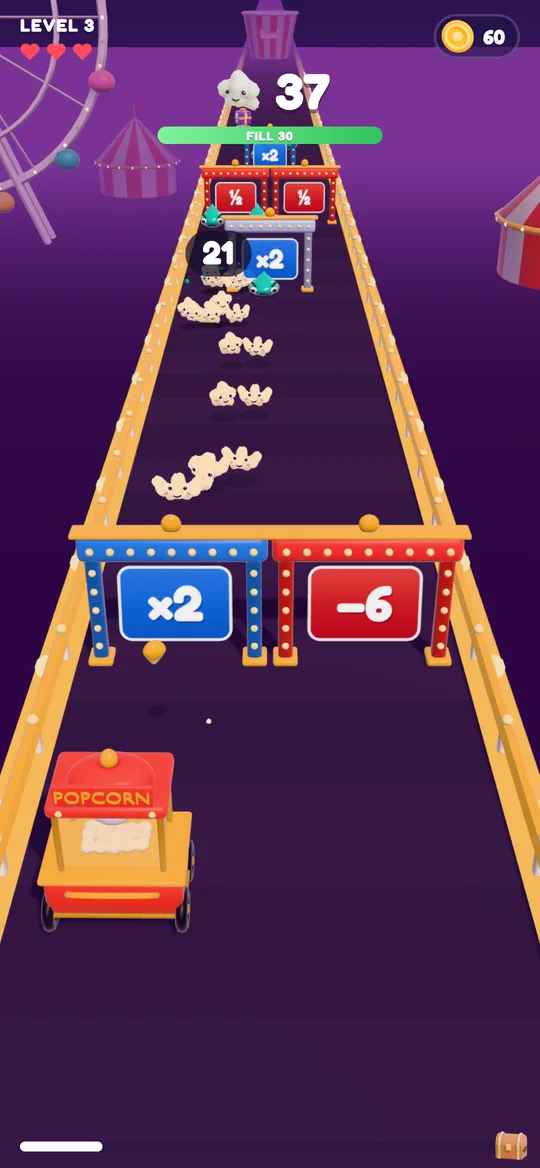
Every gate is a sign on a lit-up frame. Blue signs are good and red signs are bad, and the big symbol in the middle tells you what happens:
- ×2 or ×3 on blue: a multiplier.
- +2 up to +6 on blue: an add gate.
- − and a number on red: a minus gate.
- ½ on red: a soggy gate.
- ❄ on red: an ice gate, which appears in later levels.
The game keeps the signs short on purpose, so you can read them at a glance while you steer. The names below (POP, BUTTER, SALT, soggy) are what the game calls each type.

The blue gates: POP, BUTTER and SALT
POP ×2 and ×3
POP is the multiplier you see most. A ×2 POP doubles everything that passes through it, and a ×3 triples it. The ×3 version shows up on the stronger side of a good pair, and the very first choice of every level puts a ×3 against a red gate, so you can start strong.
POP has one extra trick. When an unpopped kernel flies through it, the Pop power upgrade makes the result bigger. That is one reason Pop power is worth buying: it quietly makes every POP gate better.
BUTTER +2 to +6
BUTTER adds its number to every piece of popcorn that runs through it, not just once. A long stream through a +4 gate gains 4 for each piece. Early levels show small numbers like +2 and +3, and bigger ones, up to +6, appear as you go further.
SALT ×2
SALT doubles whatever passes, just like a ×2 POP. On screen it looks the same as a blue ×2, so you do not need to tell them apart: blue ×2 always means double.
The red gates: minus, soggy and ice
Minus gates
A red minus gate has a fixed amount it can take, like −6. As your popcorn runs through, the number counts down. Once the gate has taken its full amount, it fades, and the rest of your crowd passes for free. Minus numbers get a little bigger as levels go up.
That makes minus gates nasty for a tiny crowd and fairly harmless for a big one. A −6 gate can wipe out a crowd of 5, but it barely dents a crowd of 100.
Soggy gates
Soggy gates show a ½. They cut every piece that passes through in half, and there is no limit. A single small piece might vanish altogether. The bigger your crowd, the more a soggy gate costs you.
Ice gates
From level 21, some red gates show a snowflake. Ice freezes popped popcorn back into cold kernels, and part of the crowd is lost on the way. Treat it like any other red gate and steer around it.
Flip gates and special rows
From level 6, some red gates are not red for long. A flip gate switches every couple of seconds between a red gate and a blue one, and the sign flashes when it changes. If you are already lined up with one, wait for blue before you send your stream through.
A few other patterns are worth knowing:
- Single gates sit in one lane with nothing beside them. They are always blue, so they are free popcorn if you drift over.
- Two red gates sometimes share a row. You cannot avoid both, so pick the cheaper one (see the next section).
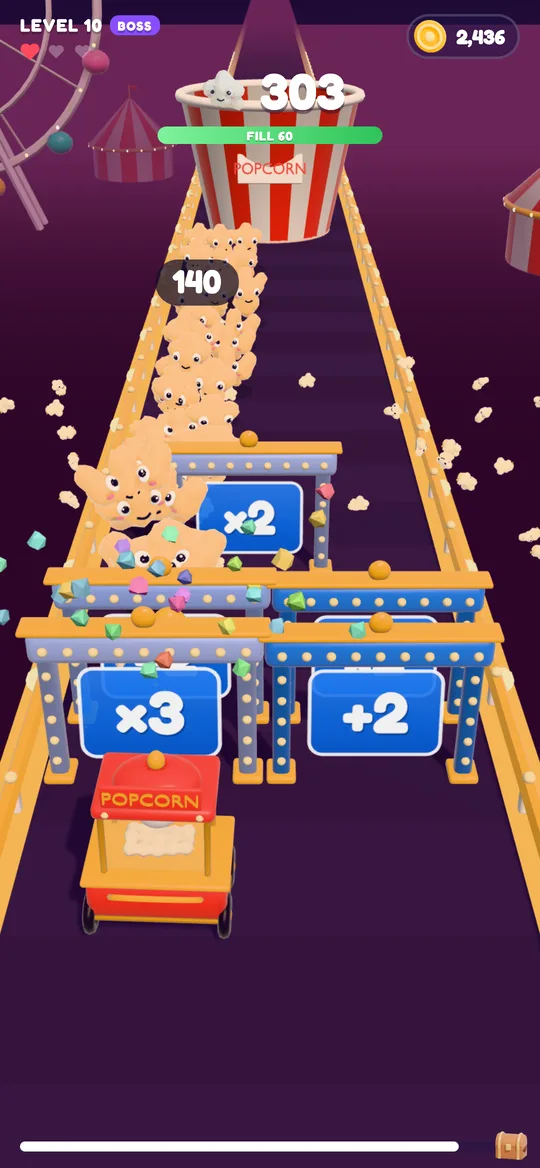
- Boss levels put a ×3 and a BUTTER gate side by side right in front of the cart, then a single SALT ×2, so your stream keeps multiplying during the fight.
For a refresher on what the boss and hard levels add, see what is a crowd runner game, which walks through the parts of a level.
How to pick the right gate
Here is a simple routine for every pair you meet:
- Look at the colours first. One blue and one red is an easy choice: go blue.
- Two blue gates? Prefer the multiplier (×2 or ×3) once you have a real crowd. BUTTER is best when your stream is short and thin, early in a level.
- If the two blue gates are close in value, stay in your lane. Swerving spreads your crowd out, and pieces that clip the edge miss the gate.
- Two red gates? Compare the minus number with your crowd. If your crowd is more than twice the minus number, take the minus gate, because soggy would cost you more. If your crowd is tiny, take the soggy gate.
- Watch for a flip. If a red gate flashes and turns blue, it is now a good gate for a moment.
- Check the Fill bar. If you already have plenty for the bucket, play safe and keep your crowd together rather than chasing a bigger number.
For more on steering, threats and upgrades, read our crowd runner game tips.
Common gate mistakes
- Swerving at the last second. Your crowd splits and part of it hits the red side. Decide as soon as a row appears.
- Fearing every red gate equally. A small minus gate in front of a big crowd costs very little. A soggy gate always costs half.
- Ignoring single gates. They are free growth with no risk.
- Skipping Pop power. It makes POP gates stronger every time kernels go through them.
FAQ
What do the blue gates do in Popcorn Panic?
Blue gates grow your crowd. POP multiplies it by 2 or 3, SALT doubles it, and BUTTER adds a small number, from +2 up to +6, to every piece that runs through.
What is the difference between a minus gate and a soggy gate?
A minus gate takes away a fixed amount, counts down as it does, and then fades so the rest of your crowd passes freely. A soggy gate halves everything that goes through it, with no limit.
Which red gate should I pick if both sides are red?
If your crowd is more than twice the minus number, take the minus gate, because it costs less than losing half. With a very small crowd, the soggy gate is the safer pick.
What are flip gates?
From level 6, some red gates switch to a blue gate and back every couple of seconds. The sign flashes when it changes, so wait for blue before you send your popcorn through.
When do ice gates appear?
Ice gates, marked with a snowflake, start showing up from level 21. They freeze popcorn back into cold kernels and part of the crowd is lost, so steer around them.